

Peloton’s new WHOOP integration, which is now live, syncs workouts in both directions and asks members for permission to access WHOOP sleep, recovery, and other health data when connecting through the Peloton app.
In case you missed it, we recently shared that Peloton launched their new two-way WHOOP integration on September 22. We have now had a chance to test out the integration and take a closer look at how it works.
Peloton and WHOOP have also highlighted two-way syncing and class details in a joint Instagram post.
The connection works in both directions. Linking WHOOP from the Peloton app brings WHOOP activities into Peloton, while sending Peloton workouts to WHOOP requires a second connection from inside the WHOOP app. Members can enable either connection individually or connect both.
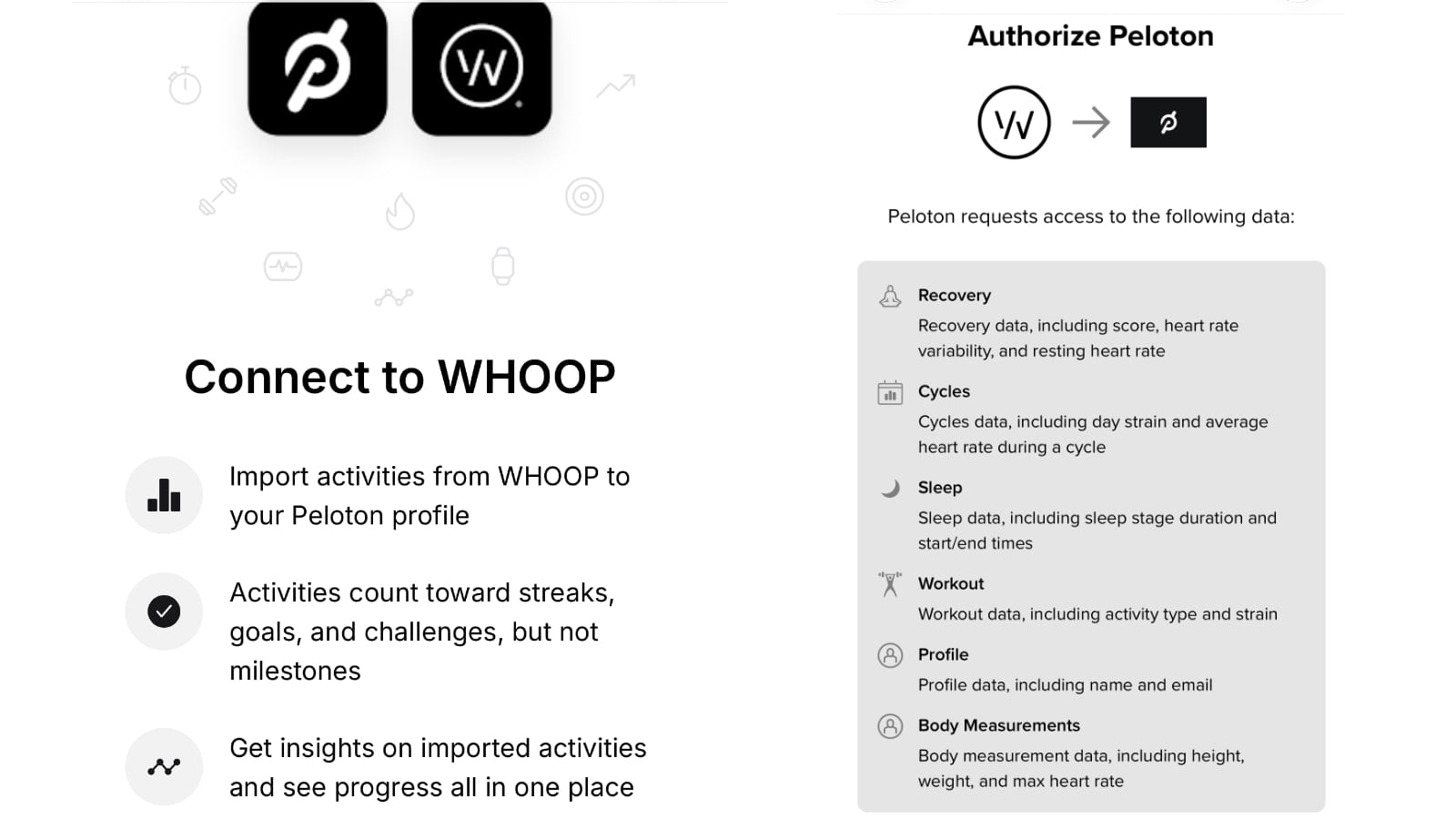
When connecting WHOOP from the Peloton app, WHOOP lists the data Peloton is requesting permission to access:
- Recovery – Recovery score, heart rate variability, and resting heart rate
- Cycles – day Strain and average heart rate during a cycle
- Sleep – sleep stage duration and sleep start/end times
- Workout – activity type and Strain
- Profile – name and email
- Body Measurements – height, weight, and maximum heart rate
The WHOOP authorization screen requests access to more than completed-workout data. In the Apple Health and Fitbit connection screens, data sharing is currently limited to workout data.
Peloton’s support page currently describes “Phase 1” of the WHOOP integration more narrowly, saying Peloton is requesting permission to access profile information such as name and email along with workout data including activity type and Strain. The Recovery, Cycle, Sleep, and Body Measurements permissions shown on the actual WHOOP authorization screen are not mentioned anywhere on the support page.
So far, we have not seen Peloton display or directly reference WHOOP sleep, Recovery, HRV, or similar metrics inside the Peloton app. Peloton’s connection screen does say available imported information “such as Heart Rate data” can be used to customize a member’s experience when the “Personalized Experience” setting is enabled.
Peloton just announced they plan to expand how they use third-party wellness data starting November 6. Peloton says shared wellness data can be used to personalize insights, recommendations, and workouts when both the relevant data category and Personalized Experience are enabled.
Peloton has not specified whether WHOOP sleep, Recovery, or HRV will be used in recommendations starting November 6. The authorization screen shows what Peloton can request, rather than confirming which metrics are being received or used by Peloton IQ.
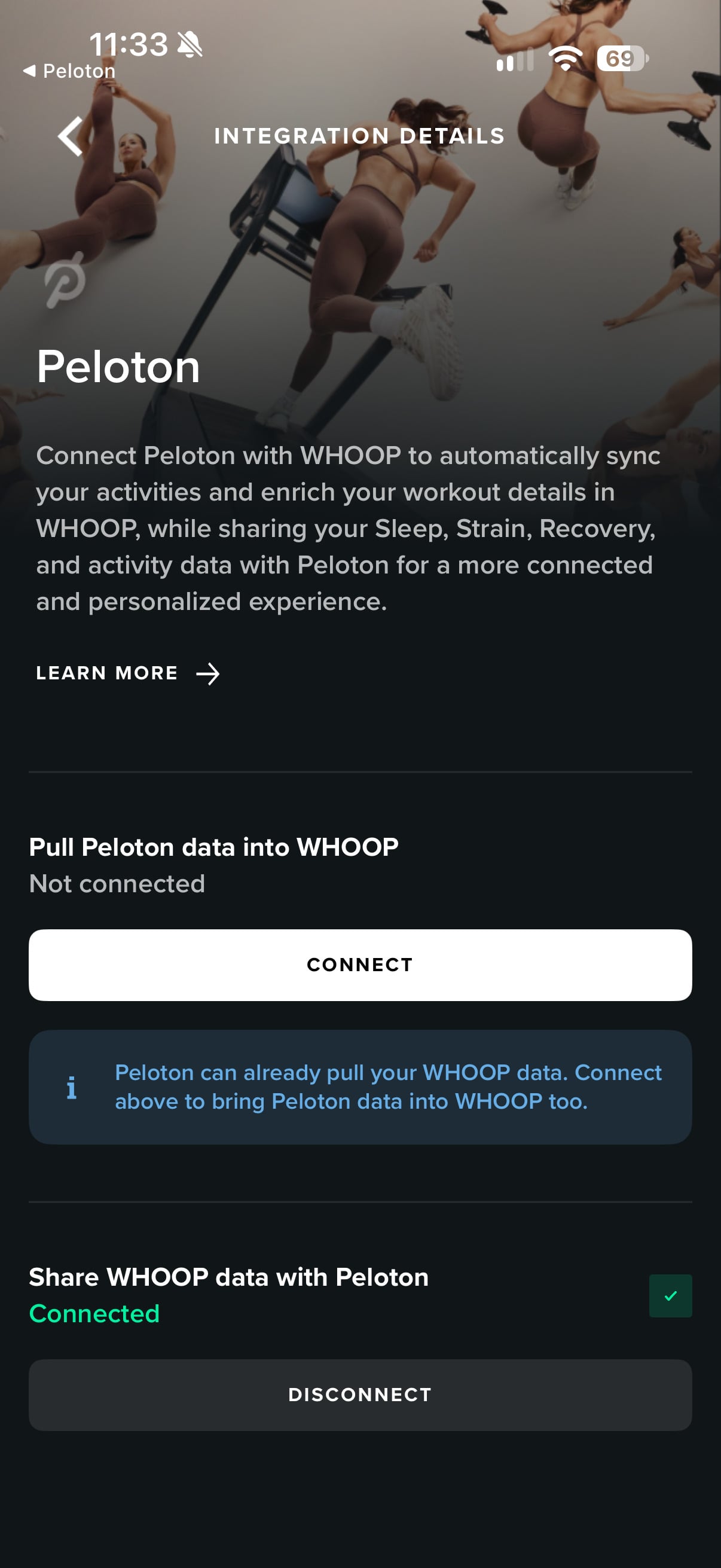
The WHOOP app describes the connection as follows:
“Connect Peloton with WHOOP to automatically sync your activities and enrich your workout details in WHOOP, while sharing your Sleep, Strain, Recovery, and activity data with Peloton for a more connected and personalized experience.”
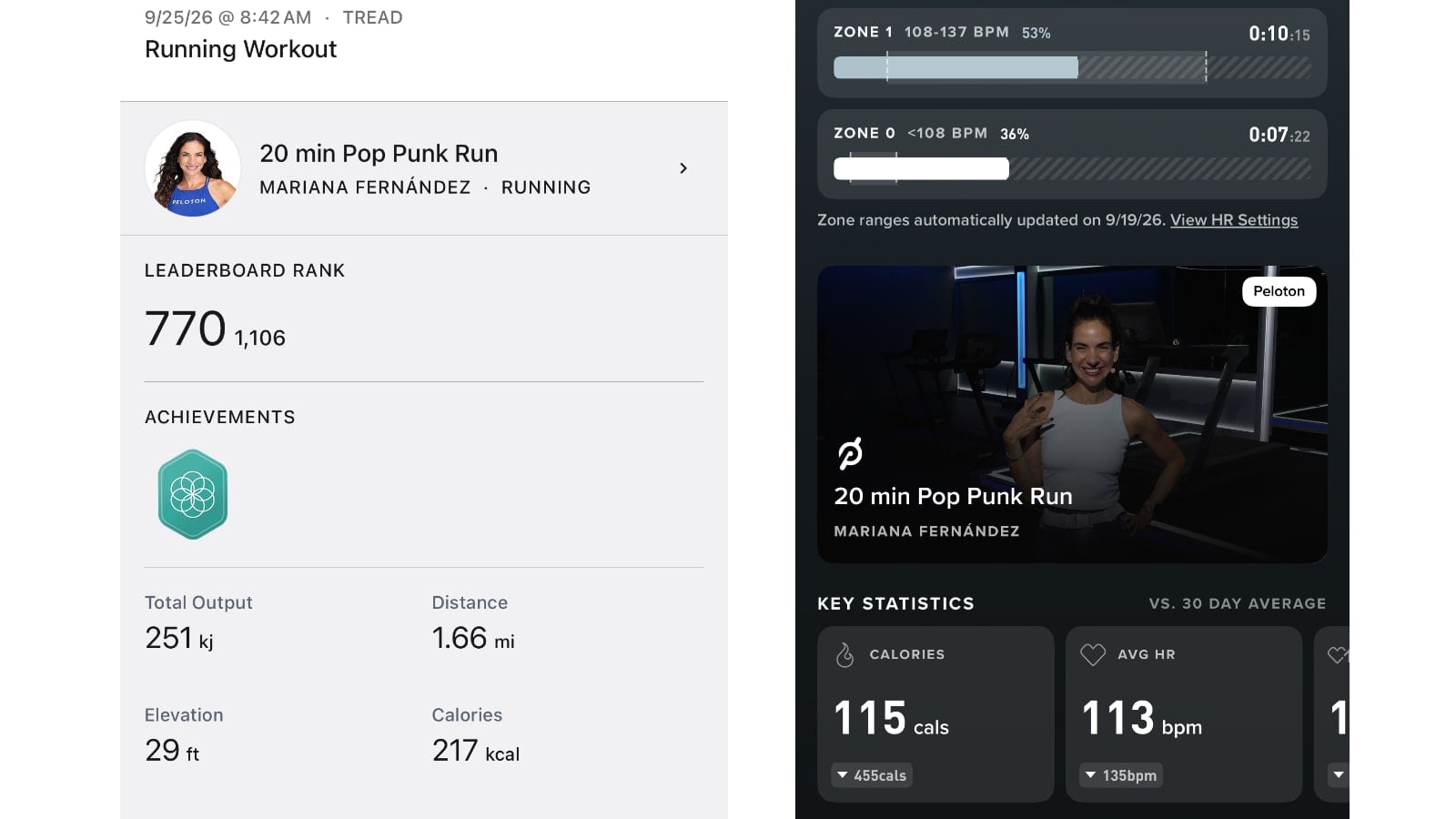
Inside the WHOOP app, Peloton workouts show up in WHOOP with a “Via Peloton” label and a card that includes the Peloton class thumbnail, class name, and instructor. Tapping the card opens the workout in the Peloton app.
WHOOP also says in their integration announcement that cycling workouts show average power and cadence alongside Strain and heart rate zones.
The workout data shown by WHOOP can differ from Peloton’s own summary. For example, our 20 min Pop Punk Run with Mariana Fernández showed 115 calories inside WHOOP, compared to 217 calories in Peloton.
Peloton’s support page also says WHOOP can show Peloton class recommendations with the class title, instructor, thumbnail, description, discipline, duration, and difficulty. According to Peloton, recommendations require connecting from the WHOOP app and are available to WHOOP members in English-speaking WHOOP markets.
When the WHOOP connection is set up in Peloton, automatic importing is enabled by default. Members can select which supported activity types they want imported, or turn automatic importing off entirely. With automatic importing off, members can return to the connection settings to manually add workouts.
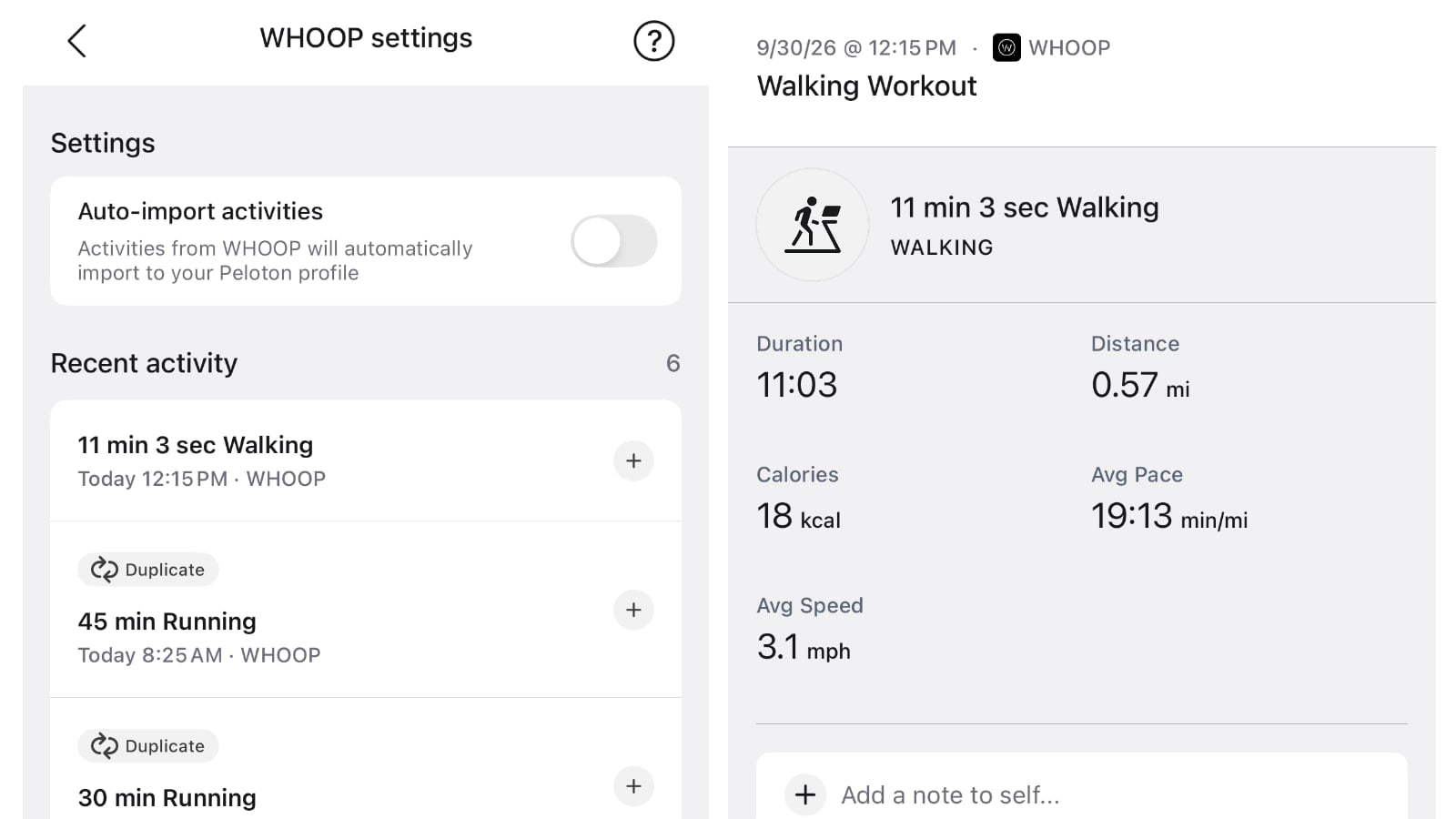
Peloton does not backfill WHOOP workouts recorded before the accounts were connected. The Recent activity list in the Peloton app shows WHOOP activities from the previous seven days. Workouts older than seven days no longer appear in that list.
Peloton also checks for duplicate workouts. If a workout taken directly on Peloton was recorded by WHOOP as well, the Peloton workout takes priority and the WHOOP version is marked “Duplicate” rather than automatically importing a second copy. Members can still manually add it if they want to.
Imported WHOOP workouts count toward Daily and Weekly Streaks, activity goals, Club Peloton points, and some challenges, but not Peloton Milestones or Milestone badges. Peloton began allowing imported third-party workouts to count toward Daily and Weekly Streaks in May.
One part of the integration we have not been able to get working yet is WHOOP support for ReRuns. Peloton said WHOOP would be one of the supported route sources for the new ReRuns feature, with route and elevation information automatically flowing into Peloton.
Our WHOOP-recorded outdoor walk successfully imported into Peloton’s Workout History, but the route has not appeared in the “Your Routes” section of ReRuns. Our test activity was around 11 minutes long, but we have not confirmed why the route did not appear. Peloton’s WHOOP support page does not mention ReRuns.
You can find Peloton’s full instructions for connecting WHOOP via their support page.
Peloton’s email about the integration recommends updating to the latest version of the Peloton app before connecting to WHOOP.
The integration follows CEO Peter Stern’s comments in August that Peloton does not plan to build their own wearable and will instead work with existing wearable platforms to bring data into and out of Peloton.
Do you plan on connecting your WHOOP and Peloton accounts?
Support the site! Enjoy the news & guides we provide? Help us keep bringing you the news. Pelo Buddy is completely free, but you can help support the site with a one-time or monthly donation that will go to our writers, editors, and more. Find out more details here.
Get Our Newsletter Want to be sure to never miss any Peloton news? Sign up for our newsletter and get all the latest Peloton updates & Peloton rumors sent directly to your inbox.

Since the feature is called ReRun, I would guess that it doesn‘t support walks, but is specifically targeting runs. Even if that‘s not the case it would make sense to include at least a 15 minimum threshold, because recreating a short 10 minute walk wouldn‘t provide any noticeable elevation or other metrics differing from a Peloton standard training.