

As part of its ongoing platform and software enhancements, Peloton has now introduced a feature that lets members see stacked class details in the class stack itself.
This new feature is accessed by simply pressing on a class in your stack from within the Peloton app, which will then open a modal showing the regular class detail screen.
Before the introduction of this new feature, members who created class stacks had to visit the class library to find class details (class plan, playlist, etc.) after adding it to their stack. For members who may have forgotten what the classes in their stack were, or why they had added them or what the playlists were, this created unnecessary friction and extra steps in order to see information about classes already in their app.
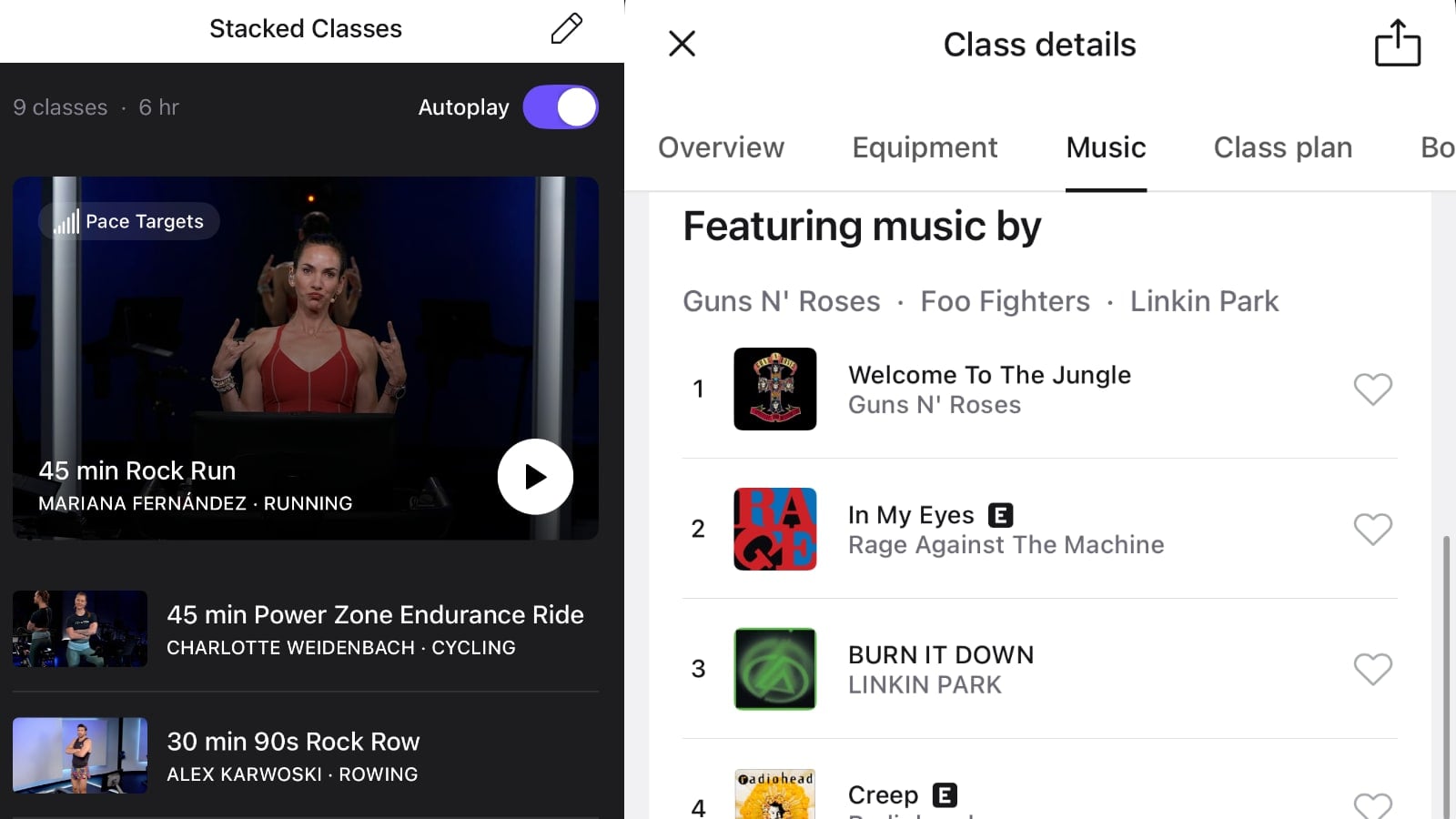
Allowing members to look at stacked class details after creating the stack will save members valuable time. Here is one example of how it might work:
- A member initially creates a stack of running classes, made up of intervals, HIIT, and tempo runs. The stack is based solely on class lengths with no attention given to playlists.
- After creating the stack, the member remembers they want to review the playlists to ensure that no song repeats across all three classes.
- Rather than returning to the class library, the member can now see the playlists in the stack itself and decide whether to switch classes or keep the original stack.
The above scenario comes in especially handy if members create stacks incorporating different modalities (strength, rowing, yoga, etc.) and then decide to review the classes in their stack as opposed to scrolling through each modality’s individual library, as shown in the video below:
Members will also find the new feature helpful when they stack classes according to class structure, but then decide they want to alter the class order after retooling their overall workout. As an example, a member may stack four Power Zone Endurance Rides in advance, with the first two all zone 2 and the second two zones 2 and 3. However, after thinking about it further, the member decides to restack the classes to start with the zone 2/3 class that has a longer warmup. This is now made much easier by reviewing the class details in the stack.
Additionally, members who create and review their stacks ahead of time can remind themselves of certain class details, such as the length of drills in rowing classes or the recommended weights in strength classes.
Though the new stacked classes feature may seem minor in scope, it continues a series of updates Peloton has been implementing as part of its software upgrades. Peloton recently made the feed tab the default view in the mobile app’s Community tab and introduced the ability to comment on workout posts in member feeds.
Additionally, members who create stacks in their mobile apps now have the option to autoplay their classes, eliminating the need to start every new class manually once the previous class ends. As noted by Pelo Buddy, the latter feature still has a few quirks that may warrant further enhancement.
All of these follow CEO Peter Stern’s goals of continuing to evolve and improve Peloton software & feature.
Support the site! Enjoy the news & guides we provide? Help us keep bringing you the news. Pelo Buddy is completely free, but you can help support the site with a one-time or monthly donation that will go to our writers, editors, and more. Find out more details here.
Get Our Newsletter Want to be sure to never miss any Peloton news? Sign up for our newsletter and get all the latest Peloton updates & Peloton rumors sent directly to your inbox.

Leave a Reply