

Peloton is beginning to display members’ real names on profile pages within the Peloton app.
Previously, when viewing your own profile or someone else’s, only the Peloton username would appear. With this change, the profile page now also displays the full name associated with the Peloton account alongside the username. The update applies both when viewing your own profile and when looking at other members’ profiles.

The real name is now shown on the same line as your location field. The layout is [User Name] [Location Icon] [Location Information].
This appears to be a continuation of Peloton’s efforts to make it easier for members to find and connect with one another. Two years ago, Peloton introduced the ability to search for friends by their real name, allowing users to locate other members without needing to know their exact leaderboard name. Now, Peloton seems to be expanding the visibility of those names beyond search results and into profile pages themselves.
This does not apply just to your own profile (depending on how other members have their privacy settings managed). You can see users real name when viewing their profiles in the app as well.
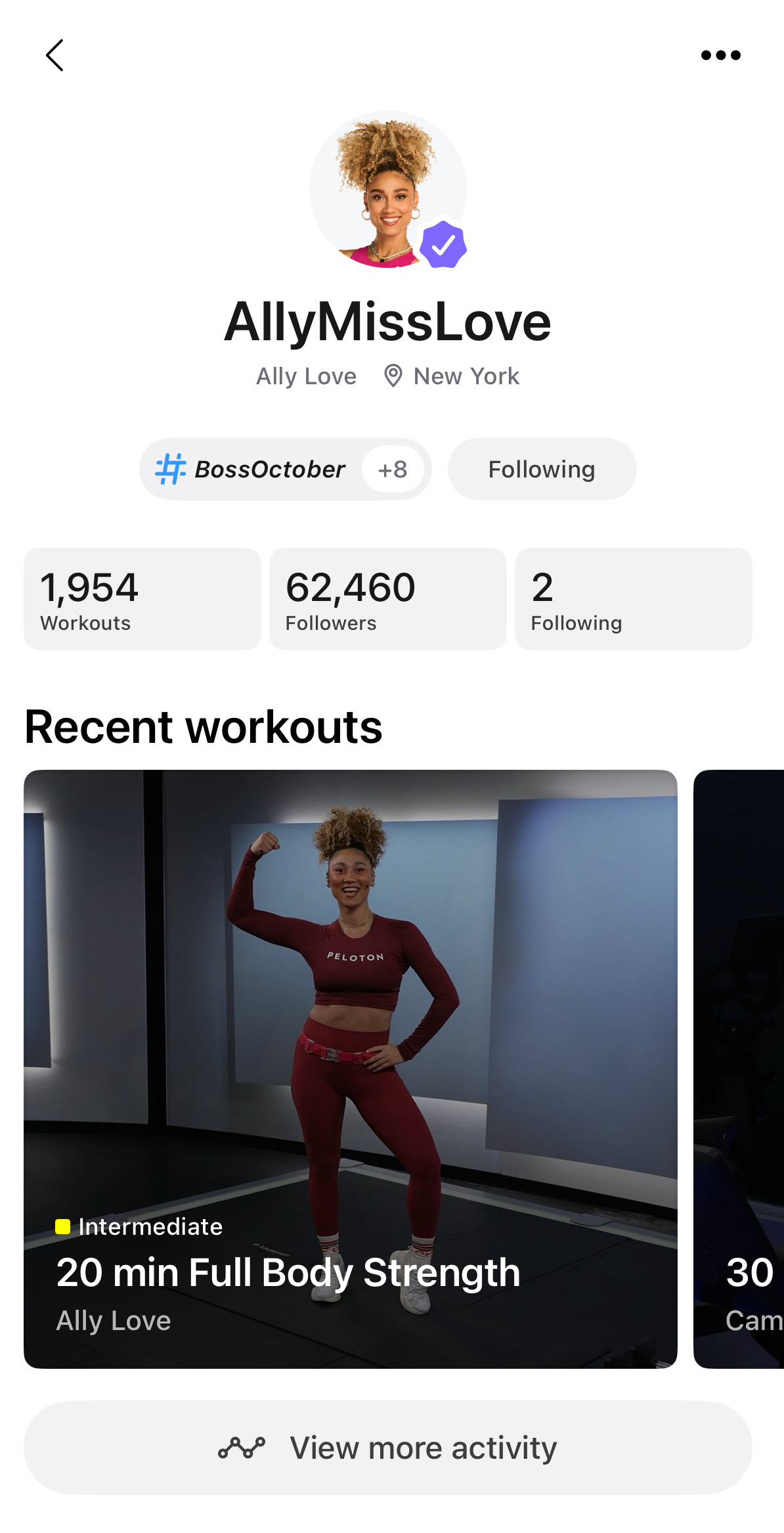
So far, the change appears limited to the Peloton digital app. As of publishing time, the real name field does not appear to be showing on Peloton’s hardware devices, such as the Bike, Tread, and Row, where profiles still appear to display usernames only.
It is also worth noting that the name shown comes directly from the “Full Name” field associated with a user’s Peloton account. Members who prefer not to display their real name publicly may want to review the privacy settings associated with this feature, which we have covered in our previous article.
Users may also edit their profile, and remove their first & last name as it appears in the public section of their profile as another way to not have their real name shown.
When the search by real name feature was first released, we shared about the privacy impact of how this was rolled out.
Similar to how Peloton rolled out the search update and included real names by default – they did the same thing here, rather than taking the privacy-first decision to make including your real name on your profile an opt-in feature.
As with many Peloton updates, this feature appears to be rolling out gradually, so not all members may see the change immediately.
Support the site! Enjoy the news & guides we provide? Help us keep bringing you the news. Pelo Buddy is completely free, but you can help support the site with a one-time or monthly donation that will go to our writers, editors, and more. Find out more details here.
Get Our Newsletter Want to be sure to never miss any Peloton news? Sign up for our newsletter and get all the latest Peloton updates & Peloton rumors sent directly to your inbox.

Leave a Reply