

There is currently a bug impacting the leaderboard for some Peloton device owners. This began appearing in the afternoon (ET) of July 10, 2024.
For those impacted, the output on the leaderboard is replaced by a large number with an a mileage abbreviation (“mi”). The large number might be member’s output being increased by 1,000 over what it normally would be – and having joules instead of kilojoules displayed with a “mi” at the end.
The user’s own output is swapped, as well as everyone else on the leaderboard that they can see.
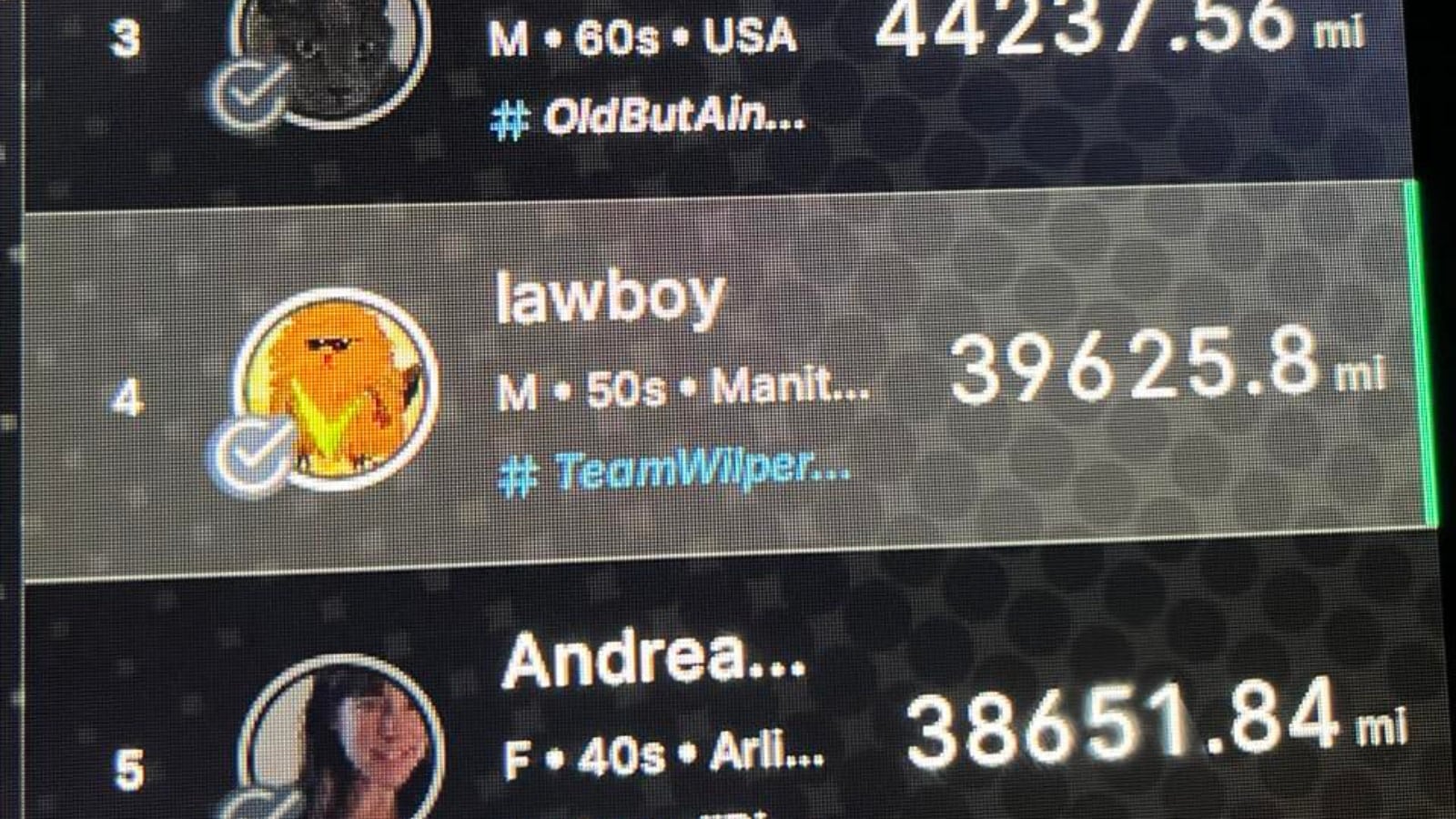
This is seen in the image above – normally there would be the output number for where a large mileage count number is shown.
This has been reported across both Peloton Treads and Peloton Bikes (so likely would be impacting Peloton Rowers as well).
The good news is that this does not seem to be impacting the data stored to user’s completed workouts and profile. Once finished, the activity is showing a normal output count on the completed activity.
Peloton created a incident report for this around 4:45pm ET, saying that the issue was “Unformatted Output Value on Leaderboard”. The status was updated around 10 minutes later, saying that a fix was being implemented and monitored.
This is a developing story and will be updated.
Support the site! Enjoy the news & guides we provide? Help us keep bringing you the news. Pelo Buddy is completely free, but you can help support the site with a one-time or monthly donation that will go to our writers, editors, and more. Find out more details here.
Get Our Newsletter Want to be sure to never miss any Peloton news? Sign up for our newsletter and get all the latest Peloton updates & Peloton rumors sent directly to your inbox.

I just experienced this and came here to see if it was a known thing. To me, it looked like the displayed data was the actually the output number, except multiplied by 1000 and displayed with a mileage label. For example, the bottom of the bike screen would have the actual output “64” and the leaderboard would say “64123 mi”.
As you stated, my ride stats were correct in my profile for the completed rides.
I wasn’t sure what it was to start. By my second class of the stack it was the output number X1,000. The ranking appeared to be correct. I have also noted issues with the ranges out of synch with the class today. On one class, they never appeared. I find the ranges helpful given I am not always paying attention to the instructor as my mind tends to wander. I still love the bike!!!
I just came here to comment since I’m #lawboy. And I like being slightly #PeloFamous. 😂
Got on this morning and my stack wasn’t loading, so I rebooted. I also noticed my watch wasn’t connecting to the bike tablet in addition to noticing new sound features rolled out. You can customize the instructor to music mix. I did notice some slight .5 second sound glitches after selecting the “more music” option. I switched back to default and no sound blips.